
Wires and context
A wire gives a card one of its inputs. The card makes its count for each item on its main input, and carries everything those items stand on.
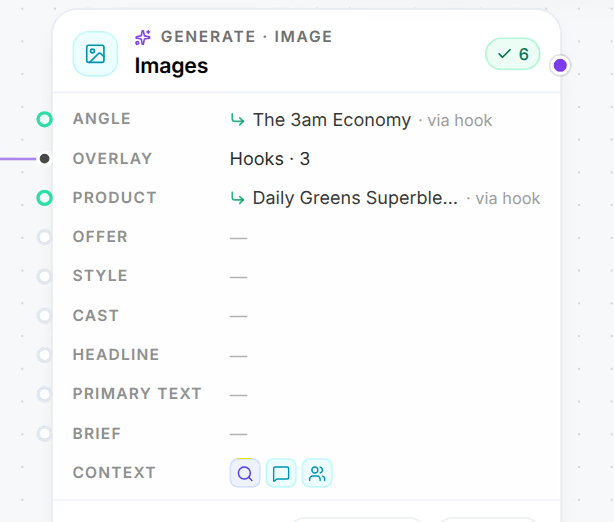
A wire tells a card what to build from, and the input it lands on says how: a hook wired into Images is printed on the creative, an image wired into Videos is the frame the video starts from. What you wire in also brings what it stands on, so a card two steps from your research still writes for the right avatar and sells the right product.
In short
- Each kind of card takes a fixed set of inputs, and only the items those inputs accept can be wired in.
- One input multiplies the card's count, one group of results for each item on it; the others are shared by every result.
- A wired item carries its own strategy with it. A card refuses a wire that would leave a result standing on two products, offers, angles or casts.
A wire is an input
Every card lists its inputs, each named for what it does with what it receives.
| Card | Its inputs |
|---|---|
| Market research, awareness and sophistication reports, voice of customer | Product, required: one report per product |
| Avatars | Research, required: a market research report and anything else it should read |
| Angles, Actors | Avatar, required |
| Offers | Product, required |
| Hooks, Bodies, Primary texts, Headlines, Descriptions | Angle, required; Voice, an actor to write as |
| Landing page, product page, advertorial and listicle copy | Angle, required; Offer; Product; Narrator, an actor |
| Images | Angle, Overlay (hooks printed on the creative), Product, Offer, Style (a creative to follow), Cast (an actor), Headline, Primary text |
| Videos | Angle, Verbal hook, Product, Offer, Start frame (images), Cast, Headline, Primary text |
| Landing, product, advertorial and listicle pages | Their copy, required: one page per copy; Product |
Every card also takes a Brief. An input marked · one in the editor takes a single item: a second wire there replaces the first. The Headline and Primary text wired into a creative are what the Launcher sends with it as its ad copy.
How many a card makes
A card makes its count for each item on its main input. Three angles wired into a Hooks card set to three make nine hooks, three per angle; two hooks wired into Images set to three make six creatives. The editor says it in words:
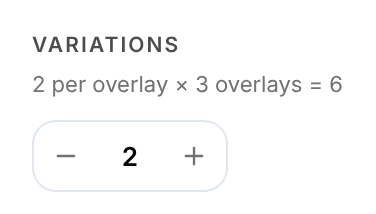
The main input is the first of these that has something wired in:
| Card | Its main input |
|---|---|
| Images | Overlay, then Angle |
| Videos | Start frame, then Verbal hook, then Angle |
| Copy | Angle |
| Angles, Actors | Avatar |
| Offers, research | Product |
| Pages | Their copy |
Every other input is shared: all the results of the card get the same offer, the same cast, the same style. Avatars have no main input: an Avatars card makes its count from all its research together.
A card you add after another card that makes things starts at ×1, because it already makes a set for each result it receives: a Videos card after an Images card that made four creatives makes four videos at ×1.
What an item brings with it
An item stands on others: an angle is written for an avatar, the avatar was distilled from research, and the research is about a product. Place the angle on a board and they come with it, joined by dotted lines, and whatever you wire it into stands on all of them. The card shows what an input brought in its rows, as in Daily Greens Superblend · via hook, and in the editor as Carried.
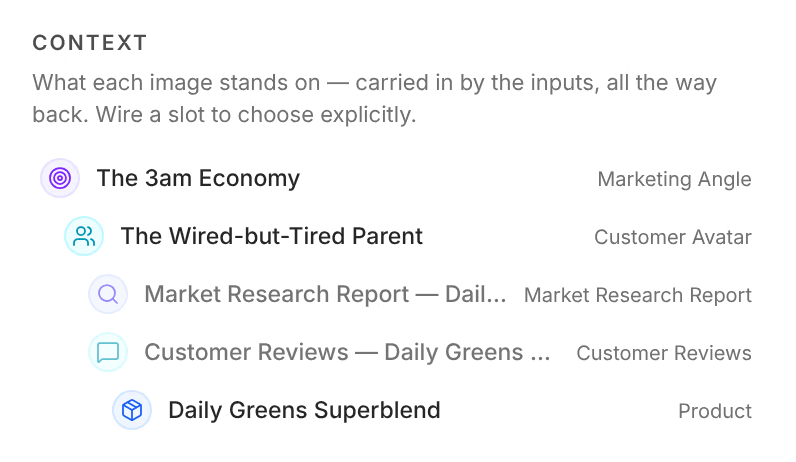
Strategy travels all the way: copy carries its angle, avatar, offer, narrator and product into the page built from it, and a creative carries its hook, product, offer, cast and ad copy into the video that starts from it. An actor or a style arrives as itself, without what it was made from. Wire an input yourself when you want something other than what is carried, such as another product.
When a wire is refused
A card says why when it will not take a wire:
| The message | Why |
|---|---|
| Hooks don’t take image as an input. | The card has no input for that kind of item. |
| That would make a loop. | The card already feeds, directly or further on, the card you are wiring into it. |
| Already connected. | The two cards are already wired. |
| Library items already exist — they only feed other nodes. | Library cards and briefs have no inputs. |
| … can’t be wired in, with what the card sells, closes on, expresses or casts | The wire would give a result a second product, offer, angle or cast. |
While you drag a wire over a card that would refuse it this way, the input reads what the card already stands on, such as Sells Daily Greens Superblend.
When inputs disagree
A board can still end up with a card whose inputs stand on two of something, for example two hooks written for different products. Its status then names the clash, such as 2 products, and it waits. Its editor shows Conflicting product at the top, which says which results are affected and lets you Build on this for the side to keep; the wires that bring the other side are cut, and CtrlZ puts them back. Where each result can keep its own, Apply does that instead.
Where this shows up
- Build a boardStart a Studio board from a starter flow or from nothing, put cards on it from Add or your Library, wire them together, and let Auto layout keep it in order.
- Cards and modelsWhat a card on a Studio board shows, and its editor: how many it makes, the model each of its stages runs on, its inputs, its settings and its direction.
- The item panelEvery Library item opens in the same panel, which says what the item is, how it performs, what you can do with it, how it was made and what it is made of.