
Create your account
Register with your email address or with Google, enter the six-digit code from your email, and sign in.

An account is you: your name, your email address and how you sign in. Setup opens as soon as you are in, and creates the workspace your stores and team belong to.
Before you start
- An email address you can open now. The code you need arrives there.
- About two minutes.
- Invited by a colleague? Open the link in their invitation instead: see Accept an invitation.
Register with your email
Open app.omnymous.com/register
The card reads Create account.
Fill in your details
First name, Last name, Email address, then Password and Confirm password. As you type the password, its five rules tick off one by one.
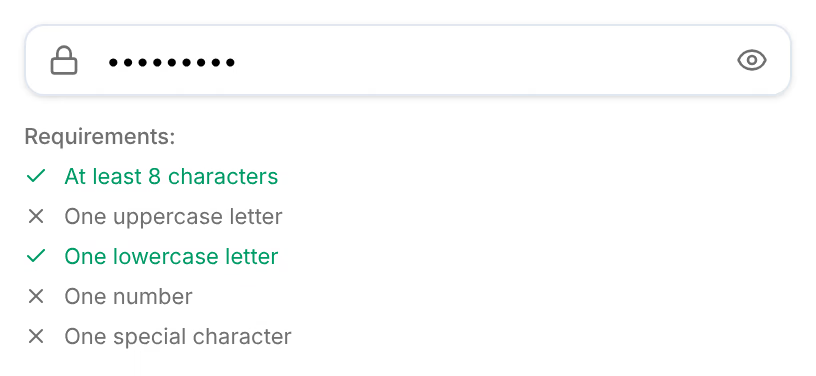
Accept the terms and press Create account
Tick the box beside I agree to the Terms of Service and Privacy Policy, then press Create account. The button stays greyed out until every rule is met and both passwords match.
Enter the code from your email
The screen changes to Verify your email, and Omnymous sends a 6-digit code to the address you gave. Type it into the six boxes. It is checked as soon as the sixth digit is in; Verify code does the same.
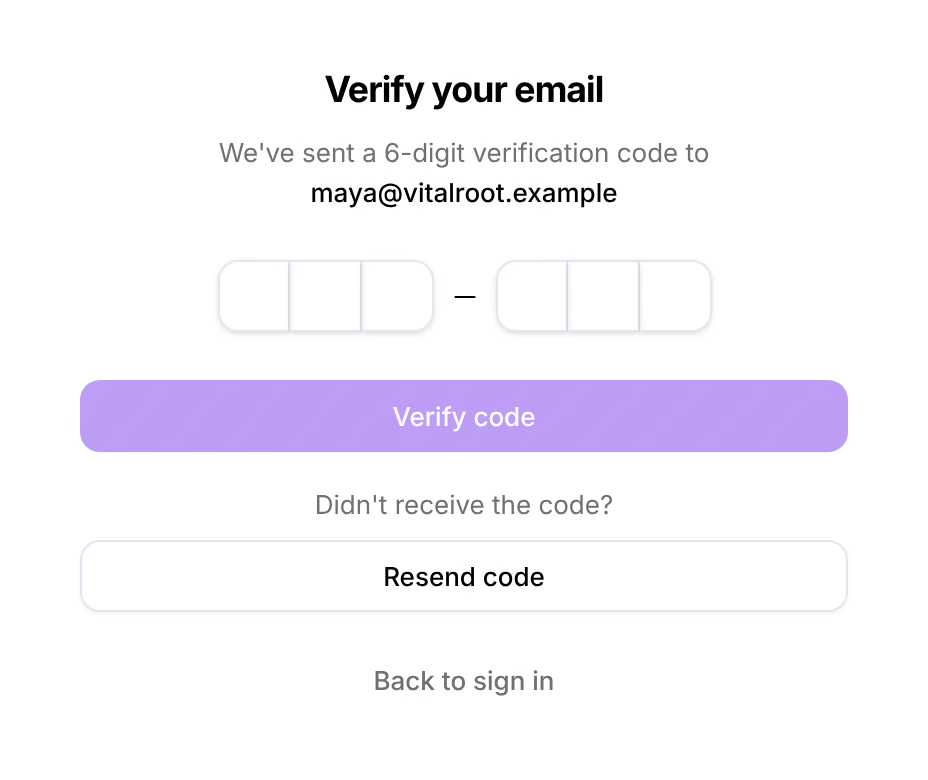

Check that it worked
The card reads Email verified and Welcome to Omnymous., and setup opens on its first step, Your plan.
Register with Google
Press Continue with Google on the same card and choose your Google account. To sign in with a password as well later, set one in Account, then Password.
Sign in again later

Remember me is ticked to start with, and keeps you signed in on this device for 7 days; untick it and the session lasts a day. Forgot password? emails you a link to choose a new password.
Enter your email and password and press Sign in, or press Enter in the password field.
Accept an invitation
If a colleague invited you to their workspace, you do not register first. Open the link in the invitation email. The page reads You're invited!, says who invited you and to which workspace, and shows the role you will have.
- New to Omnymous: enter your name, choose a password and press Accept invitation.
- Already have an account: press Sign in to accept, sign in, then press Accept invitation.
An invitation belongs to the address it was sent to. Signed in with another address, the page offers Sign in as followed by the invited one. Decline turns the invitation down.
If something goes wrong
| What you see | What to do |
|---|---|
| “That code is not right. Check the email and try again, or request a new code.” | Use the newest email: each new code replaces the ones before. After five wrong codes, the screen asks you to wait 15 minutes. |
| “This code has expired. Request a new one below.” | A code works for 15 minutes. Press Resend code. |
| No email arrives | Look in spam, then press Resend code. You can ask for five codes an hour. |
| “Please verify your email address before logging in” | Omnymous takes you to Verify your email and sends a new code. Enter it there. |
| “Invalid email or password” | Check the address, then use Forgot password? |
More cases, with what each message means, are in I cannot sign in.
Related
- Connect your storeLink your Shopify store during setup, then set its Omnymous pixel to Always on so Shopify never pauses it.
- Find your way aroundThe frame around every screen of Omnymous, on a computer and on a phone: the sidebar, the store switcher, the top bar and your account menu.