
Tag your ads
Put each ad's id in the link of the Meta ads you already run, so the orders they bring are credited to their campaign, ad set and ad.

A click on an ad carries the platform’s own click id, so Omnymous always knows an order came from Meta, Google or TikTok. To credit it to the campaign, ad set and ad that brought it, the ad’s link must also carry the ad’s id in utm_content. That is what Attributed Revenue is built from, beside the Reported Revenue the platforms claim.
Ads launched from Omnymous carry the tag already. This page adds it to the Meta ads you run outside Omnymous.
Before you start
- Meta connected to your store. See Connect your ad accounts.
- Permission to edit the ads in Meta Ads Manager.
- Only visits from after the tag can be credited to the ad. Earlier ones stay credited to Meta as a whole.
Tag a Meta ad
Open the ad in Meta Ads Manager
Edit the ad itself, not its campaign or ad set: the tag belongs to each ad. To tag many ads, select them together and edit them at once.
Add the tag to its URL parameters
In the ad’s tracking settings, find URL parameters and add
utm_content={{ad.id}}. Meta puts the ad’s id in place of{{ad.id}}on every click. Ifutm_contentis there already, replace its value and keep the other parameters.Publish the change
From the next click on, the visits the ad brings name it, and the orders they lead to are credited to it.
Check that it worked
Open Analytics, then Campaigns. Each campaign Omnymous follows reads Launcher if Omnymous launched it, or Observed if it was found in your ad account. Tracked and Untracked above the table filter them.
As orders come in from tagged clicks, the campaign’s Pixel-attributed columns fill beside the Platform-claimed ones. A dash means nothing has been credited to it yet.
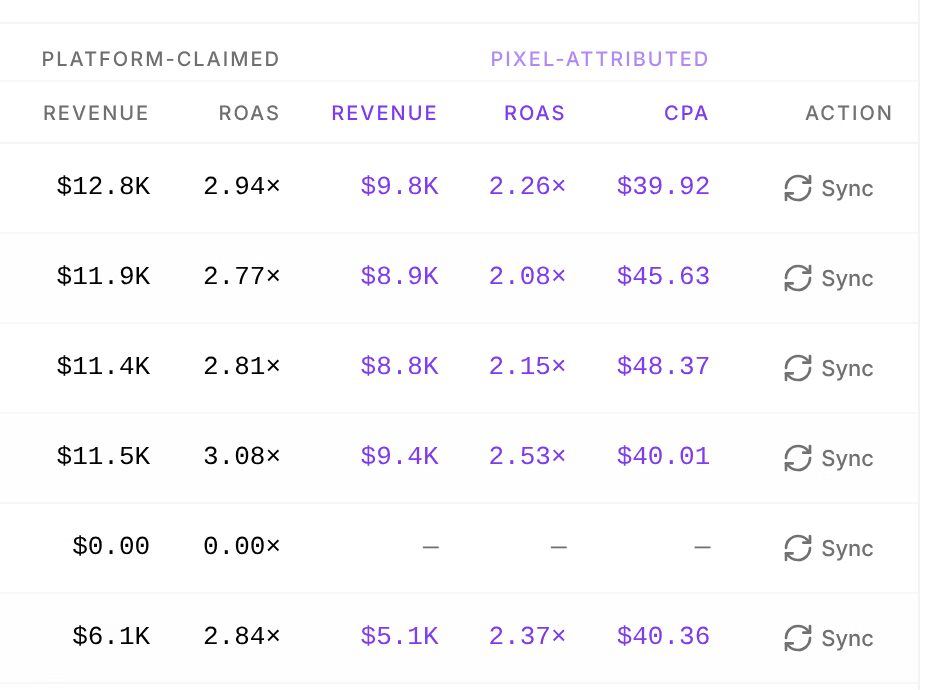
A Meta campaign that reads Untracked has Import at the end of its row. Import & track in the Track this campaign dialog makes Omnymous follow it.
Google and TikTok ads
Their clicks are credited to Google and TikTok from the click ids those platforms add, with no tag. Crediting an order to a single Google or TikTok ad also takes that platform’s id for the ad in utm_content; this page gives the value for Meta only. Write to support@omnymous.com before you tag Google or TikTok ads.
If something goes wrong
| What you see | What to do |
|---|---|
| Pixel-attributed stays a dash | Credit starts with clicks after the tag. Check that the ad’s URL parameters read exactly utm_content={{ad.id}}, with both pairs of braces. |
| A campaign has no Import | Import is for Meta campaigns Omnymous does not follow yet. A campaign marked Launcher or Observed is followed already. |
Your own utm_content values disappear from other reports | The tag replaces them: Omnymous needs this one parameter to carry the ad’s id. Keep your other parameters for your own labels. |
Related
- Connect your ad accountsConnect Meta to launch ads and read their results, and Google and TikTok to read theirs, during setup or later in Settings.
- DashboardThe Dashboard shows the last 30 days of your store in one screen: what you earned, what you spent, and how your creative did.