
Explore
Explore is every ad Omnymous has read from the Meta Ad Library, with filters to narrow it to your market and an inspector that takes one ad apart.

Explore is the whole corpus: every ad Omnymous has read from the Meta Ad Library, from every brand, as a wall of cards. The number at the top right counts them. Open it from the sidebar, under Reconnaissance; on a phone, from the Recon tab.
What you can do here
- Save what you findSwipe the angles, hooks, avatars and offers you find in Briefs and Explore, import them into your Library tied to one of your products, and hand them to Studio.
- Brand dossierOne advertiser seen whole: how many ads it runs and for how long, what it sells, where its ads send buyers, and its strategy in your Library's terms.
- BriefsBriefs measures what your competitors run against what you already have, gaps first, and keeps the roster of brands you track and the ones you could.
The toolbar
| Control | What it does |
|---|---|
| Search | Finds ads by their words, their captions and their brand's name. Ctrl F opens it. |
| Relevant to you | Keeps only the ads of brands in your arena, the ones selling what you sell. A dot marks it when it is on. |
| Filters | Shows or hides the filters beside the feed, and counts the ones in use. |
| Newest | Ads by the day they launched, latest first. |
| Just found | Ads by the day Omnymous first read them. |
| Longest running | Ads by how long they have run: the ones a brand keeps paying for. |
| Most scaled | Ads by how many variants run beside them. |
The round arrow at the end of the toolbar reloads the feed.
The filters
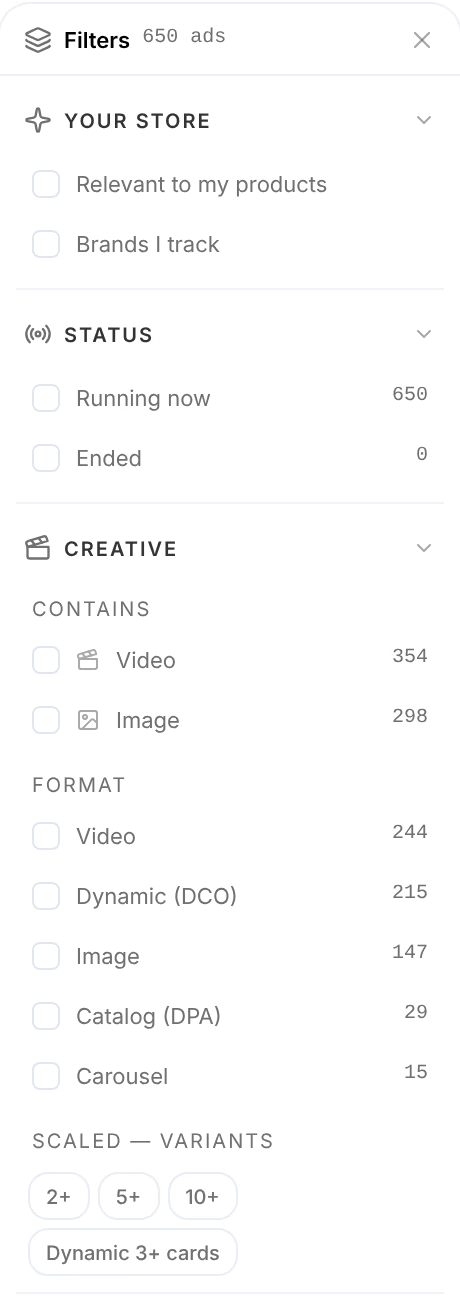
Every filter narrows the feed at once, and the address in your browser keeps them, so a filtered view can be sent as a link. Most options show how many ads of the whole corpus carry them.
| Group | Narrows the feed to |
|---|---|
| Your store | Ads Relevant to my products, or from Brands I track |
| Status | Ads Running now, or Ended |
| Creative | What an ad contains (video, image), its format (video, dynamic, image, catalog, carousel), and how scaled it is: 2, 5 or 10 variants or more, or a dynamic ad of 3 cards or more |
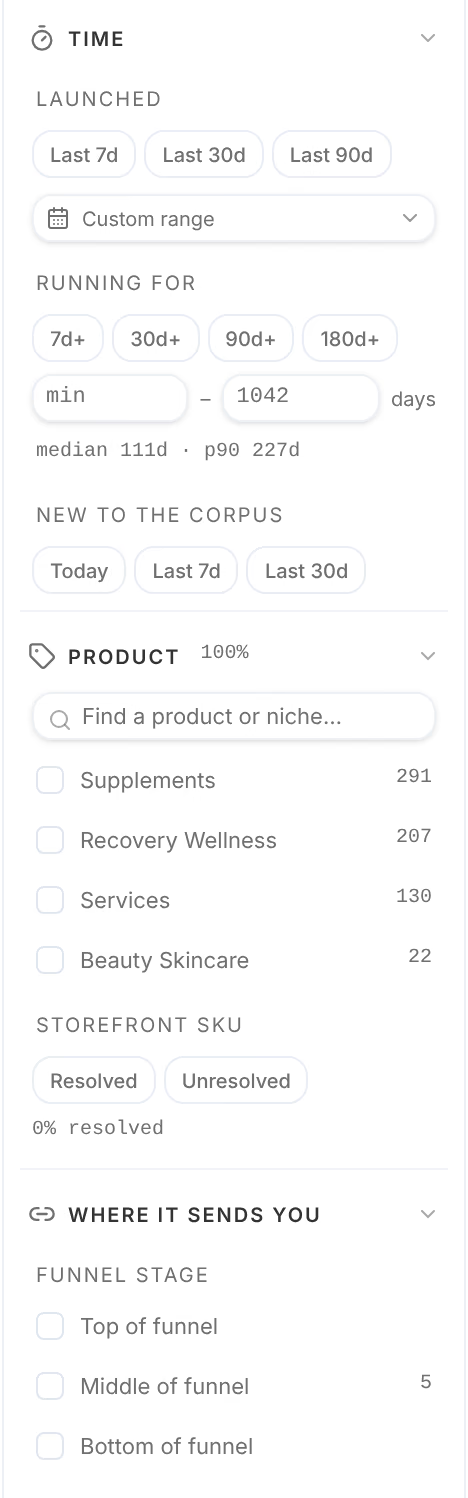
| Time | When it Launched, how long it has been Running for, and when it was New to the corpus |
| Product | What it sells, by category, niche or product; a search finds one |
| Storefront SKU | Whether the product page it sends to was read |
| Where it sends you | Its Funnel stage, whether it has a landing page, the kind of page, and the page's domain |
| Call to action, Placements, Advertiser | The button it carries, where Meta shows it, and the brand behind it |
When nothing matches, the feed says so: No ads match these filters. Loosen a filter, or track more brands.

An ad's card
Each card shows the ad's creative, then what it is and who runs it:
- Live, or ended, and its format: video, image, dynamic with its number of cards, catalog or carousel. A chip such as Your product or Your category says how close it comes to what you sell.
- The brand. Its name opens its dossier; the radar beside it tracks the brand without leaving the feed; the library mark opens the ad in the Meta Ad Library.
- Its headline, the page it sends buyers to, and the button it carries, such as Shop now.
- Running, the days it has run; Family, solo or the number of variants that run beside it; Launched, the day it started.
A card with variants steps through them with its arrows. A video plays without sound until you unmute it.
An ad taken apart
Press a card to open it in the panel on the right. The panel holds the creative and its variants, then:
- Copy: the words the ad runs, shared by all its variants, with Import to bring them into your Library.
- The button it carries, the page it sends to and that page's place in the funnel, such as Consideration.
- Running or Proven (past 180 days), Family, Placements and Launched.
- The brand, with its live and total ads.
- Strategy, for a brand that has been mapped: the angle, avatar, hook or offer this ad carries, each with how many of the brand's ads carry it and the words that show it. Swipe saves one for later, Import brings it into your Library, and Import all brings them all.
At the foot, one button opens the page the ad sends to, and Track brand tracks its brand; it reads Tracking once you do. The panel's address is the ad's own, so you can send it as a link.