
Journeys
Journeys draws every path a visit took through your store, from an ad or a search to an order, and where the ad and its page stopped agreeing.

Journeys follows the visits the Omnymous pixel recorded, step by step: where they came from, the page they landed on, the product they saw, the cart, the checkout and the order. It has two views at the top right: Canvas, every path as one map, and Paths, the exact sequences ranked.
The Canvas
The row of figures counts the sessions that reached each step: Sessions, then the funnel stages, each with its share of all sessions and of the step before. Credited revenue is the revenue the attribution model credits to those sessions. See Credited Revenue.

| Name | What it does | Default or limit |
|---|---|---|
| All entries, Ads only | Every session, or only the sessions that started on an ad. With Ads only, a row of platforms narrows it further. | Default All entries |
| Colour | What colours the ribbons: how well an ad and its page agree, or how many of the sessions went on to order. | Default Congruency |
| Derive | Rebuilds the map from your sessions now. Omnymous also does it as visits arrive. |
The map reads left to right, one column per step: Source, Landing, Product, Cart, Checkout and Order. Each ribbon is a flow of sessions from one step to the next, as thick as its sessions. To keep the map readable, the smallest sources and pages are folded into one block, such as "230 more sources".
Congruency
With Congruency chosen, a ribbon from an ad to its page is coloured by how far the page argues what the ad promised: the same angle, the same avatar, the same offer and the same product.

The figure beside each colour is its effect on orders per click, measured by the Lab: in the demo store, aligned pairs convert 1.08 times the average. Ribbons that do not run from an ad to a page are grey. The line under the legend says how many of the ad-to-page sessions could be scored, and what was folded. The Lab ranks congruency like any other dimension: see Attribution Lab.
A step or a flow
Press a step to open it on the right; press a ribbon to open the flow between two steps.
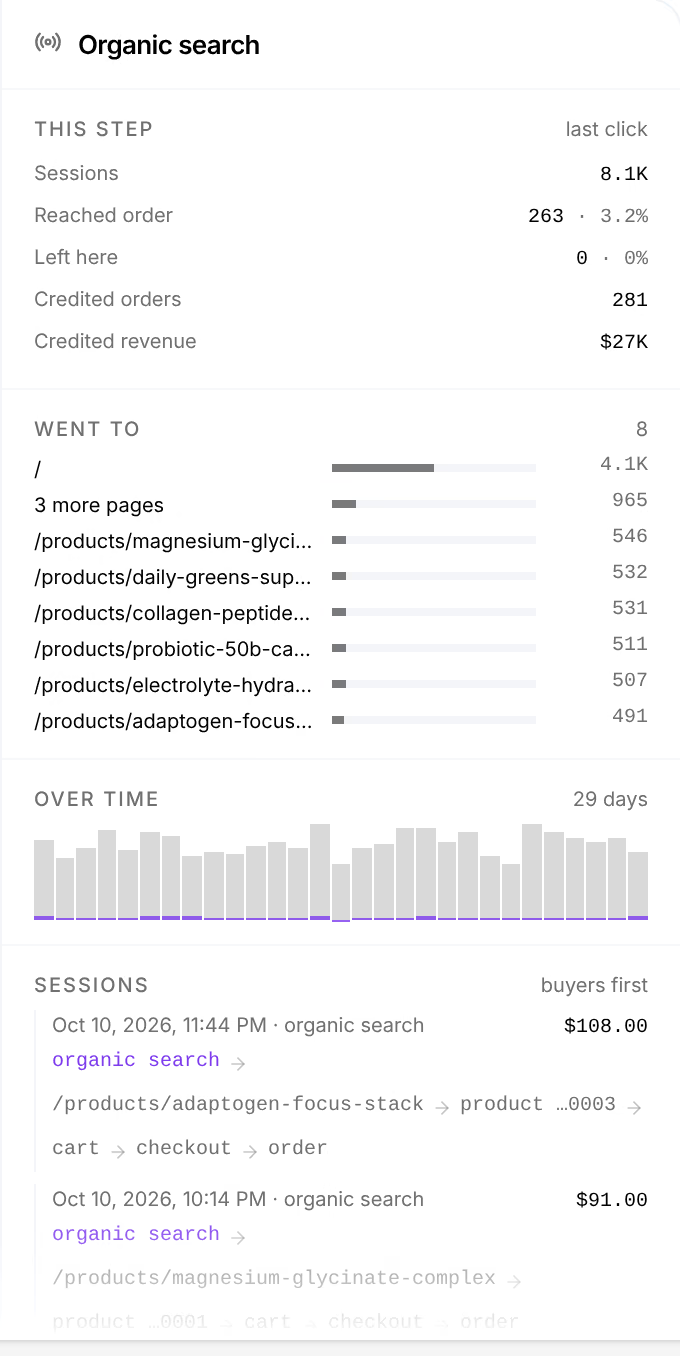
This step gives the step's sessions, how many reached an order and how many left here, and the orders and revenue credited to it. Came from and Went to list the steps before and after it, Over time draws its sessions day by day, and Sessions lists real sessions through it, buyers first. For a flow from an ad to a page, the panel also sets what the ad carries beside what the page argues, with buttons into the Lab, Studio and the page editor.
On a computer, the arrow keys walk the map: up and down within a column, left and right along the heaviest flow. Enter switches between a step and its main flow, and Esc clears the selection.
Paths

One row per exact sequence of steps a session took, busiest first: its Sessions, Buyers and Buy rate, and the revenue credited to those sessions. Every session or Buyers only chooses which sessions are ranked.