
Attribution Lab
The Lab credits revenue to each hook, angle, avatar, offer and page inside your ads, and says how sure it is of each one.

An ad platform tells you which ad sold. The Lab tells you which of its pieces did: the hook, the angle, the avatar, the offer, the page, and each property of them, such as one desire an avatar holds. Each piece is an atom. Open it under Analytics, then Creatives, then Lab.
The Lab compares each atom with the average atom of its kind, all else equal, and says how sure that comparison is. A number it cannot separate from the atoms it always shipped with is labelled as such, never ranked.
What you can do here
- Choose how credit is splitCarried, Shared and Fitted, and what each adds up to.
- See the tests you ranThe experiments Omnymous found in your launches.
- Cross two variablesEvery pairing in a matrix, with the ones you never tried.
The toolbar

| Name | What it does | Default or limit |
|---|---|---|
| Carried, Shared, Fitted | How each ad's credit is passed on to its atoms. Carried, Shared and Fitted explains the three. | Default Fitted |
| 30d, 90d, All time | Which fit the effects are read from: the model fitted on the last 30 days, the last 90, or everything. When a wider window holds no ads beyond a narrower one, the Lab reads the narrower fit and says so: "same as 90d". | Default 90d |
| Search | Narrows the atoms with a few words: stage:attention, dim:desire, spend>500, ads>=3, and identified, weak or confounded. Press the filter icon at its end for the list. | |
| Refit | Fits the model again now, for every stage. It also runs by itself every night. |
The figures on the right describe the fit. "78% identified at attention" is the share of the stage's evidence that rests on atoms the Lab can tell apart; it turns amber below half. "fit 90d · 248 ads · φ 1.0 · predictive" names the window, the ads it learned from, how noisy delivery was, and whether the fit predicted the creatives launched in its last weeks better than a model that knows only your campaigns and weeks. Until a stage has been fitted, the line reads "no fit for this stage yet".
Dimensions
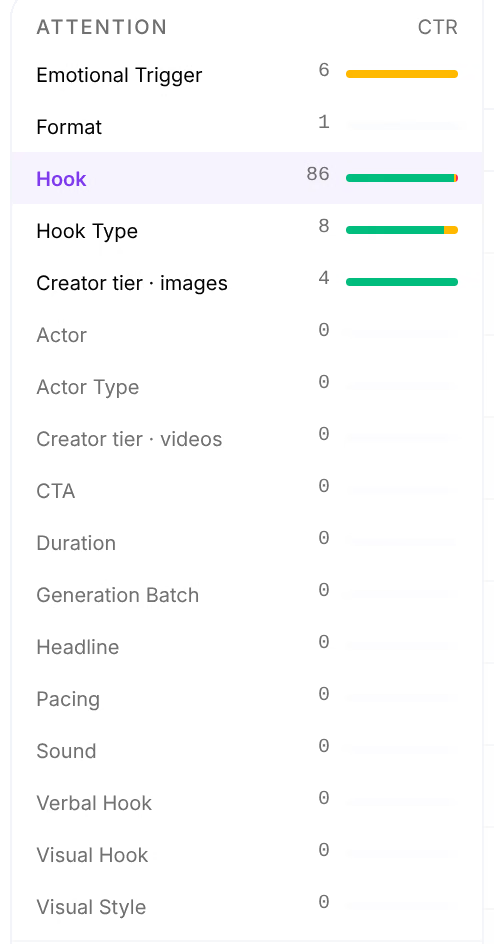
The left column lists every dimension, grouped by the stage it acts on. Each stage has its own measure, so an atom is judged where it can make a difference: a hook on the clicks it earns, an offer on the orders.
| Name | What it does |
|---|---|
| Attention | Measured on CTR, clicks per impression. Hooks, hook types, emotional triggers, formats, actors and visual style. |
| Intent | Measured on the add-to-cart rate of the visits. Angles, avatars, desires, fears, dislikes and the awareness stage. |
| Conversion | Measured on orders per click. Offers, discount types, guarantees, landing pages and templates, and how well the page matches the ad. |
| Basket | Measured on the average order value. Products and discount depth. |
Beside each dimension: how many of its atoms your ads carried, and a bar of how many the Lab can tell apart, in green for identified, amber for weak and red for confounded. A dimension with 0 atoms had no spend in the period on creatives Omnymous knows. Your own properties appear too, in the stage of the item they belong to: a property of creatives under Attention, of pages under Conversion. In the demo store, Creator tier · images is one.
Atoms
Choose a dimension to list its atoms, most spend first. Press a column's name to sort by it.
| Name | What it does |
|---|---|
| Spend | What the ads carrying the atom spent. Spend |
| CTR, ATC rate, CVR or AOV | The atom's rate at its stage: clicks per impression, add-to-carts per visit, orders per click, or order value. |
| Revenue | The revenue credited to the atom under the model in the toolbar. Revenue |
| Incremental | What the atom earned compared with an average atom of its dimension, negative when it cost money. Incremental |
| Effect vs family | How the atom's rate compares with its dimension's average, with everything else its ads carried held equal. The bar is its 90% interval: the narrower, the surer. Effect vs family |
| P>family | The probability that the atom truly beats its dimension's average. P>family |
| Call | What the Lab is prepared to say about the atom. See below. |
In the demo store, two creator tiers have been called: images by freelance creators lift CTR 1.29 times over the average tier, and agency images trail it at 0.70.

Calls
| Name | What it does |
|---|---|
| Winner, Loser | The atom is identified, the probability that it beats, or trails, its family is at least 97.5%, and the risk of a wrong call across every atom of the stage is at most 5%. Only these are calls. |
| Leads, Trails | Identified and pointing up, or down, but not yet sure enough to call. More spend can settle it. |
| Leans up, Leans down | The verdict is weak: the data lean one way, but the ads that ran vary the atom too little to say much. |
| Confounded | The atom always ran beside the same other atoms, so its number belongs to the group. Atoms that always shipped together are bracketed and share one row of figures. |
| Structure | The atom changed only with the campaign or ad set, so its effect cannot be told from theirs. |
| Single | Every ad carried the same value: there is nothing to compare it with. |
Rest the pointer on a call to read the figures behind it. To separate atoms that are confounded, launch ads that vary one while holding the other. Experiments shows the tests your launches already contain.
The last row, Average bundle, is what the same ads would have earned with every atom replaced by the average atom of its dimension. Under it, one sentence says what the effects were measured against.
Contrasts
Contrasts, beside Atoms, sets atoms of the same dimension against each other, the surest pairs first.

Ratio is the stronger atom's effect divided by the weaker one's, with its 90% interval and P(beats), the probability that the stronger one truly is. A contrast is only called when it clears a bar corrected for every pair compared. Ratio
Gaps
Gaps lists the pairs of atoms that never ran together, and what the model expects of each.

Choose the second dimension in the row above the table: Angle, Customer Avatar, Offer, a page and more. Each row gives the expected rate at the stage, its 90% interval and Value / 1k, the contribution the model expects per 1,000 exposures. Expected rate and Value / 1k Generate opens Studio with the two atoms already chosen.
An atom up close
Press an atom's name to open it on the right.
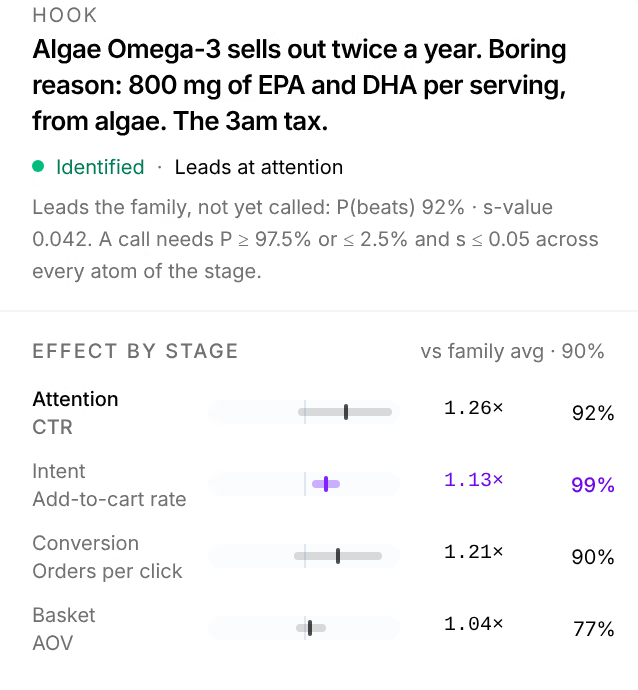
It opens on the atom, its verdict and its call, with the figures behind the call. Effect by stage measures the atom at every stage, not only its own: a hook that earns clicks may also bring buyers who order more. When the atom has any, Cannot be told apart from lists the atoms it always ran with. Earned vs the average hook gives its incremental revenue, contribution and orders, then Evidence the spend, impressions, clicks and orders behind it, its weekly rate and its Contrasts.
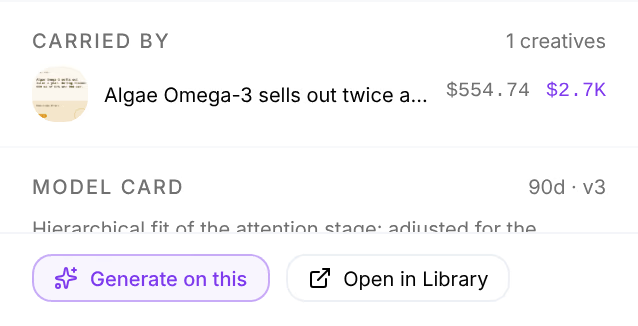
Carried by lists the creatives that carried the atom, and Model card how well the fit itself did. Generate on this opens Studio with the atom in hand. Open in Library opens the atom's own item.